I Tried Building an AI Second Brain with Obsidian and Claude Code. Here’s What Stuck.
Let me get straight to the point, or none of this will make sense.
You’ve probably seen “second brain” trending lately. Obsidian, Claude Code, bidirectional links, Zettelkasten, every concept under the sun. Every time you see it, you think maybe this time it’ll stick. So you download Obsidian, create a few folders, map out a elaborate “knowledge management system” in your head… and then nothing. You never touch it again.
Here’s the thing, that’s not really your fault. Most second brain solutions out there have too high a barrier to entry.
But I recently came across an approach that’s different. No dark magic, no monthly subscription for some standalone product, no need to install seven different plugins. Just two free tools plus an API key, and it all runs locally on your own machine.
What Makes This Setup Different
Tech blogger McKay Wrigley posted a tutorial on YouTube called “How To 10x Your Notes: Obsidian + Claude AI Agents” showing exactly how to hook Obsidian up with Anthropic’s Claude Code, turning your note vault into an intelligent agent that can think proactively, do research, and actually get things done for you.
You probably already know Obsidian , it’s that free, local Markdown-based note-taking app where your data stays on your own computer and doesn’t get fed into some company’s training pipeline.
The real star here is Claude Code. It’s Anthropic’s official command-line tool, runs right in your terminal with a single command. McKay’s key insight is this , it’s not really a coding tool at all. It’s an AI agent system that’s exceptionally good at understanding what you want and using tools to get there.
Think of it as leveling up from a specialized coding tool to a general-purpose agent. It can read your instructions, manipulate local files, search the web, even autonomously run research tasks for you.
I’m not going to walk through the installation step by step , McKay’s video has all of that, just search for it. But here’s what it looks like once you’re set up: open Obsidian, create a new vault, navigate to that folder in your file manager, right-click and select “Open in Terminal,” type claude and hit enter.
Why Claude Code Is the Real Star
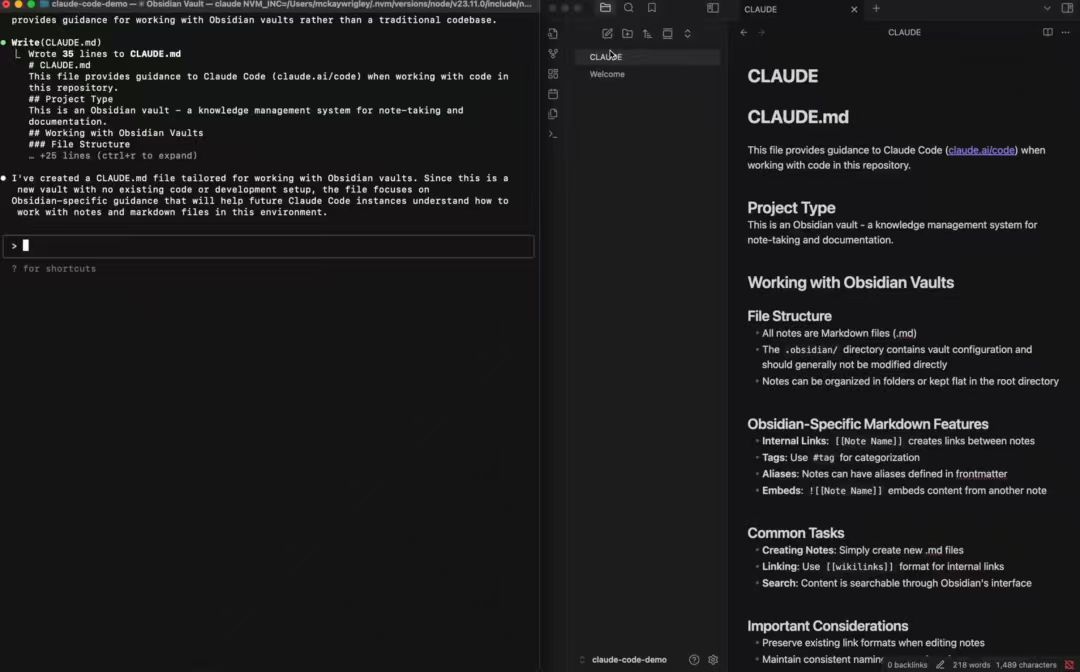
Your personal AI agent is now live. Its “eyes” are watching your entire note vault. You talk to it directly in the terminal, telling it to operate on your files.
But this isn’t even the main event yet.
In the terminal, type a slash /, select /init, and Claude Code will automatically create a file called CLAUDE.md in your vault’s root directory.
The Secret Weapon: CLAUDE.md
This file is where the magic lives.
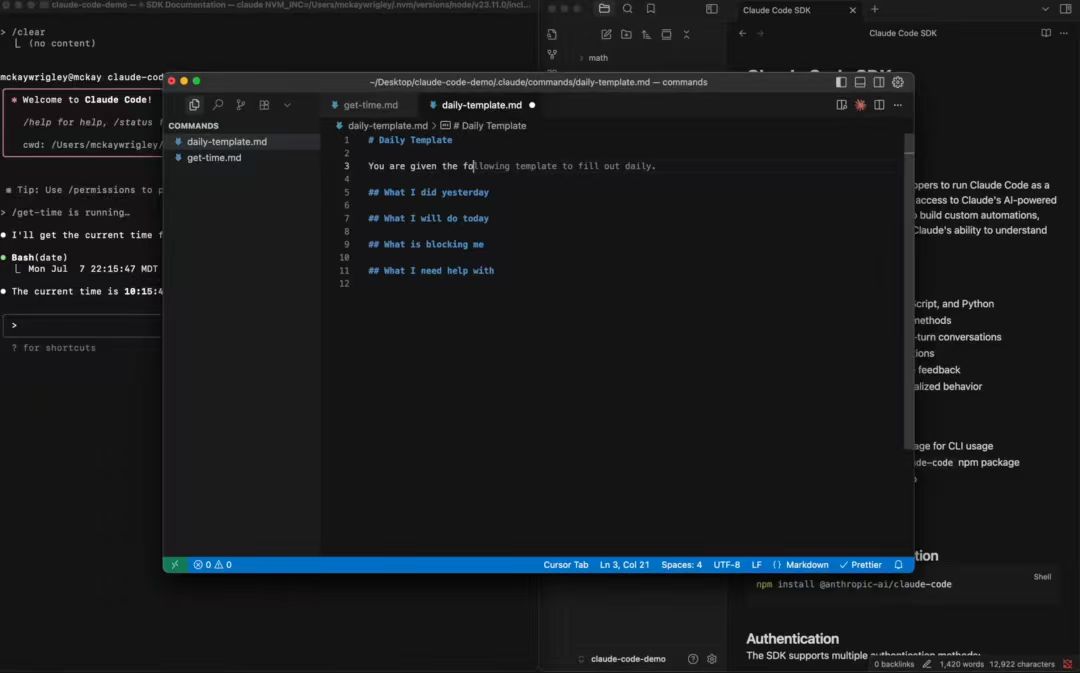
Think of it as the “supreme instruction set” you write for your AI agent. It’s injected at the start of every single conversation , meaning every time Claude talks to you, it reads this file first. How should it communicate with you? What format should the notes it creates follow? Should it auto-add tags? What link structure should it use? Every rule lives here.
McKay gave a simple example: if you don’t want tags cluttering your notes, just write “Do not use tags” in CLAUDE.md. Or you could go the other way and define an extremely detailed tagging convention , specifying which folder each type of note goes in, what naming prefixes to use, the whole thing.
It’s worth investing real time in this file. It directly determines your AI agent’s personality, style, and work quality. Set it up once, benefit forever.
What You Can Actually Do With It
Once your rules are in place, you’ve got an assistant that’s both obedient and powerful. You can direct it with natural language in the terminal just like using ChatGPT, but it can do way more than chat.
Want it to create a file? Just say “Write me a note about the Fibonacci sequence” and it’ll instantly generate a detailed, well-formatted Markdown file. Editing is just as easy , use the @ symbol to specify a filename, like @fibonacci-sequence.md, then say “please add a ‘Fun Facts’ section at the end” and it’ll insert content exactly where you asked.
File management works the same way. Tell it to delete a file, or create a new folder and organize related notes into it, and it’ll intelligently figure out which notes count as “related” and handle the rest automatically.
The more powerful part is its proactivity. When you’re writing about a concept in your notes, the AI will proactively jump in and ask “want me to look up background info on this?” or “I noticed you’re researching this topic , you might also be interested in another note.”
The Proactive Layer
This isn’t hype. McKay demonstrated all of this live in the video. Obsidian’s bidirectional links already let you connect notes to each other. Add AI’s understanding on top of that, and the system starts functioning like something that’s genuinely digesting your knowledge base , a thinking partner rather than just a storage system.
McKay also showed off another use case , assigning the AI a research task. It automatically searches the web, reads through relevant notes already in your vault, and synthesizes everything into a structured research report. Not just a pile of information, but genuine new insight that comes from the AI actually processing what you already know.
That’s the fundamental difference. Traditional PKM tools make your notes “findable.” This system makes your notes “usable.”
Research Tasks, Not Just Note-Taking
Now, here’s the bigger question , do we actually need a second brain?
My take is, most people abandon their second brain not because the tool is bad, but because the maintenance cost is too high. You have to manually create bidirectional links, manually build your graph, manually write your cards. After every session of note-taking, you need to set aside dedicated time to “organize.” Human energy is finite. Spend that finite energy on endless knowledge management, and the inevitable result is giving up.
What McKay’s approach does well is drive that maintenance cost down to near zero. You don’t manually manage links, tags, or graphs. You just describe what you want in natural language, and the AI does the rest. The more detailed your CLAUDE.md rules, the better it understands your preferences and the better it assists you.
The Real Difference: Usable vs. Findable
Of course, this approach has its own barriers. CLAUDE.md takes real time to design well. There’s a learning curve. API calls cost money , you need a paid Claude account and an API key. If you’re the type who wants something that works the second you download it, the setup phase alone will filter you out.
But if you’re willing to spend an afternoon actually building this system, and you can accept that “the first two weeks will feel clumsy,” I think it’s worth trying.
At the end of the day, building a second brain , the tool is never the real barrier. The real barrier is whether you’re willing to keep feeding it over time. And the smart thing about this system is that it makes the “feeding” part lighter. You chat with it, it organizes for you. Your research behavior itself is what maintains the system.
So Do You Actually Need a Second Brain?
That might matter more than any of the fancy features.