Skip to content
AIForker

AI Tools, Tutorials, and Insights。

AIForker

AI Tools, Tutorials, and Insights。

  • Home
  • AI Tool Reviews
  • AI Guides
  • AI Agent
    • Codex
    • Hermes
    • Openclaw
    • Claude Code
    • Gemini
  • China AI
    • DeepSeek
    • GLM
    • Qwen
    • Doubao
    • MiniMax
    • Seedance
    • Kimi‌
    • iFLYTEK Spark
  • AI Prompts
  • About Us
  • Home
  • AI Tool Reviews
  • AI Guides
  • AI Agent
    • Codex
    • Hermes
    • Openclaw
    • Claude Code
    • Gemini
  • China AI
    • DeepSeek
    • GLM
    • Qwen
    • Doubao
    • MiniMax
    • Seedance
    • Kimi‌
    • iFLYTEK Spark
  • AI Prompts
  • About Us
  • https://www.facebook.com/
  • https://twitter.com/
  • https://t.me/
  • https://www.instagram.com/
  • https://youtube.com/
Home/AI Tool Reviews/Archyl Review: The Architecture Diagram That Keeps Up With Your Code
AI Tool Reviews

Archyl Review: The Architecture Diagram That Keeps Up With Your Code

By Forker
June 26, 2026 2 Min Read
0
Updated on June 29, 2026

Every engineer has drawn the same architecture diagram twice. The first time it takes hours. The second time is always worse, because the code has already changed since the first draft, and nobody told the diagram.

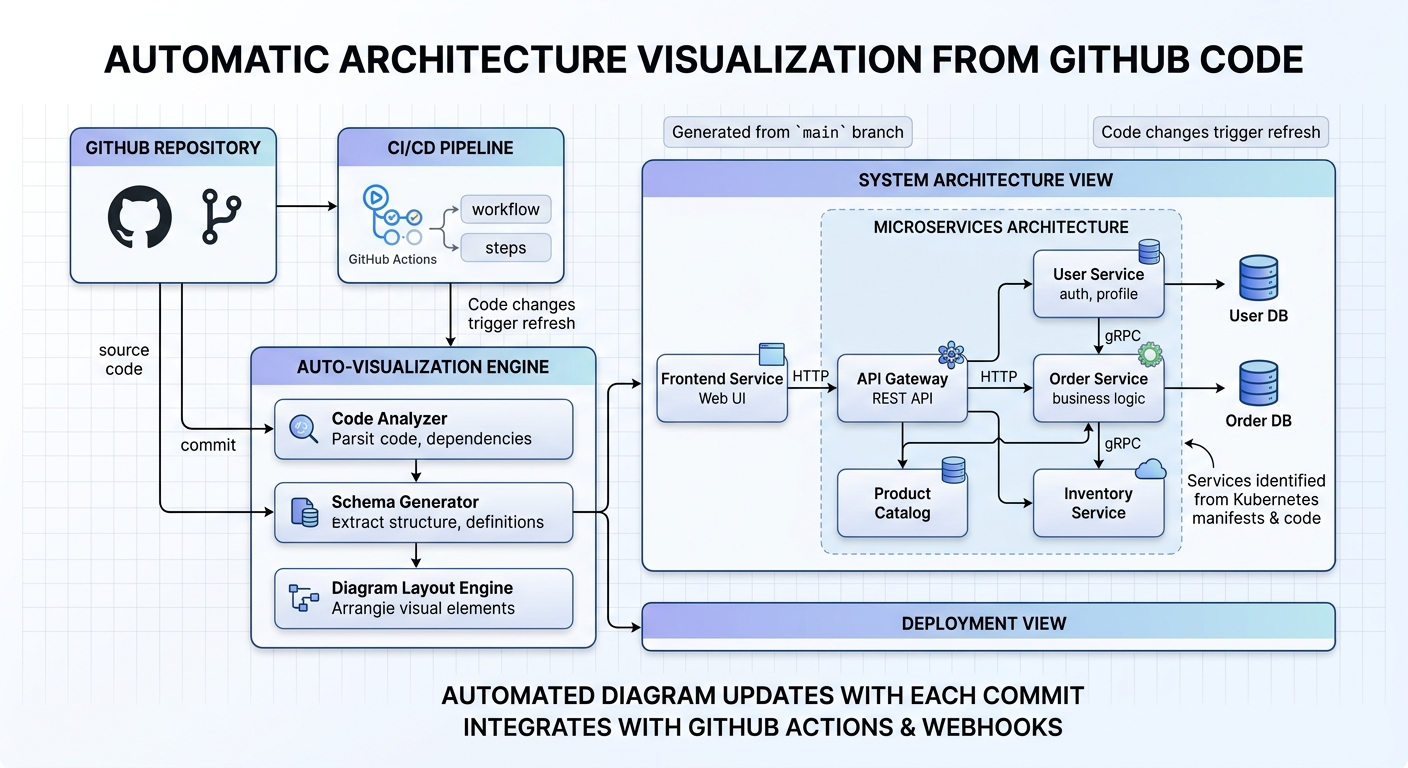
Archyl removes the drawing entirely. Connect it to GitHub or GitLab, and it scans your services, databases, and dependencies, then produces a C4 architecture diagram automatically. Every subsequent git push updates it without you doing anything.

C4 breaks architecture down into four levels of zoom: System Context, Containers, Components, and Code. Archyl handles all four. You can click any box in the diagram and see exactly what it connects to, what depends on it, and what happens at each level of detail. It’s the difference between a static diagram and a navigable map.

The practical value didn’t hit me until sprint ten of a project I’d been working on. Nobody had touched the architecture documentation in weeks. The diagram was current — because it had come directly from the code, not from someone’s memory of what the code was supposed to do. When someone new joined the team, they could navigate the architecture themselves instead of asking me to explain it.

The setup is straightforward if you’re already on GitHub or GitLab. The harder question is whether your team will actually trust a diagram that was auto-generated. There’s a bias toward hand-crafted documentation — if it looks like it was made by a machine, people sometimes assume it can’t be trusted. Worth being intentional about how you introduce it, and making sure the first version is accurate before you point people at it.

What I find more valuable than the initial diagram is the update behavior. When the diagram updates automatically after each push, it captures decisions that would normally never make it into documentation — the new service that got added but nobody documented, the dependency that quietly changed. It’s an audit trail of architecture decisions made in code, expressed visually.

The limitations are honest: it’s only as good as your codebase’s structural clarity. If your code is heavily tangled, the diagram will reflect that. It’s not a magic fixer for architectural debt. But for codebases that are reasonably well-structured, it’s one of the more practical documentation tools I’ve used.


Related Articles:

  1. WorkBuddy Skills Explained: From Setup to Self-Evolution
  2. Krea 2 Turbo: The Fastest Open-Weights AI Image Generator at 2 Seconds Per Image
  3. Google’s NotebookLM Now Generates TikTok-Style Videos From Your Research Notes
  4. A 900KB AI Model That Compresses 100MB Files to 7MB. How It Actually Works
  5. HalluSquatting Attack: Hackers Weaponize AI Hallucinations to Build Botnets
  6. China Issues Emergency Warning as Claude Code Ships Massive v2.1.206 Update

Tags:

ai-toolsai-codingai-newsai-future-tech
Author

Forker

Follow Me
Other Articles
Previous

Murmur Review: One Chat Window for All Your AI Coding Agents

Next

Daisy.so Review: One Product Photo In, a Full Marketing Campaign Out

No Comment! Be the first one.

Leave a Reply Cancel reply

Your email address will not be published. Required fields are marked *

Latest Articles

  • Codex + OpenMontage Made Me Throw Out My Editing Software
  • 10 Open Source Scrapers That Do What Paid APIs Do
  • Hermes Agent v0.20.0: It Finally Learned to Talk Back
  • PhotoGIMP: How I Turned GIMP into a Free Photoshop Clone
  • 8 Gemini Notebook Prompts That Actually Work
  • How I Built My Own Automation Hub (And the Problems That Nearly Stopped Me)
  • Hermes v0.19.1 Quietly Fixes the Frictions That Annoy You Most
  • Five AI Agents, One Trading Decision: The Architecture Behind the 95K Stars

Categories

  • DeepSeek
  • Qwen
  • GLM
  • Kimi‌
  • Codex
  • Hermes
  • Openclaw
  • Claude Code
  • Gemini
  • Hunyuan
  • China AI
  • AI Agent
  • AI Prompts
  • AI Tool Reviews
  • AI Guides
  • AI News

Tags

AI agent collaboration AI agent memory AI benchmarks AI coding assistant memory AI coding tools AI coding workflow AI context window AI dashboard AI deployment AI implementation AI models AI orchestration AI policy AI privacy AI security alternative AI hardware Anthropic ChatGPT Claude Claude coding Claude Tag Copilot cybersecurity developer tools FLUX GitHub code diagram knowledge management LLM LLM security local-first long context AI Midjourney Notion alternative Obsidian OpenAI OpenClaw open source open source AI persistent AI prompt-injection real AI coding agents Slack AI spreadsheet automation US government AI vetting workflow engine

About

Latest AI industry news and trend analysis, as well as tool evaluations.

Quick Links

  • About AIForker
  • Contact
  • How We Test
  • Privacy Policy
  • Tags

Category

  • AI NEWS
  • AI TOOL
  • AI GUIDES
  • CHINA AI
  • AI PROMPTS
Copyright2026 — AIForker.com. All rights reserved.